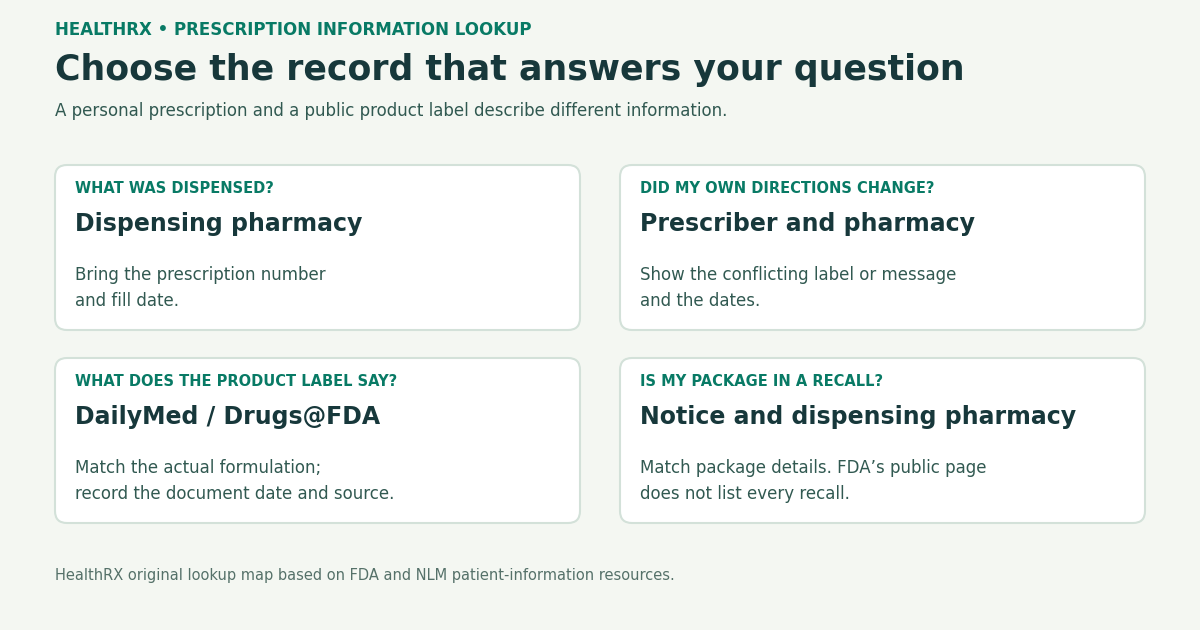
Find Current Prescription Details: Match the Record to the Question
Start with what you need to know. The directions for your own prescription, the product you were dispensed and general information about a drug live in different records. Finding the right document is more useful than collecting several pages that answer a different question.
Begin With the Bottle and the Question
Read the name, medicine, strength and directions on your dispensing label. If a detail is unfamiliar or conflicts with what your clinician told you, contact the pharmacy or prescriber and show the conflicting information. MedlinePlus recommends checking the label and asking about unfamiliar details. [1]
Keep a copy of the information you are asking about. A label from a previous fill, a message about a changed prescription and a public product label describe different events. Dates help the pharmacist or prescriber identify which change needs clarification.
| Information you need | Record or source to ask for | Useful detail to bring |
|---|---|---|
| What was dispensed at a particular fill | Dispensing pharmacy | Prescription number, medicine name and fill date |
| Whether your own directions changed | Prescriber and dispensing pharmacy | Conflicting label or message and its date |
| General product instructions and ingredient information | Product-matched public label | Name, manufacturer, strength, formulation and product identifier if available |
| A readable explanation of the medicine | MedlinePlus drug information or patient labeling | Exact medicine and formulation |
| Whether an announced recall concerns your package | Recall notice and dispensing pharmacy | Manufacturer, package details and lot information when available |
Search for the Actual Product Label
FDA's medicine-information guide describes searching DailyMed by medicine name, manufacturer, NDC code or set ID. These details help narrow the result when a name appears on several formulations. In Drugs@FDA, select the relevant product and the type of document you need, such as a label, Medication Guide or Instructions for Use. [2]
A tablet, capsule, liquid or extended-release formulation may have its own instructions. Compare the result with the actual package before carrying a sentence from a search result into your question. If the package does not show a detail you need, ask the dispensing pharmacy which product record matches the medicine it supplied.
Record Which Label You Found
DailyMed is provided by the National Library of Medicine. It publishes company-submitted labeling currently in use. That labeling can differ from the most recent FDA-approved labeling available through Drugs@FDA. The two sites provide different document histories, so record the database, product and displayed update or revision date. [3,4]
The date on a public label describes that document. It does not identify the date your clinician changed your personal prescription. Keep those dates in separate fields when you compare records.
Choose Patient Information for the Question You Have
Patient Package Inserts, Medication Guides and Instructions for Use serve different reading tasks. FDA describes Instructions for Use for products with complicated administration instructions; Medication Guides explain issues specific to particular medicines or classes. Not every medicine has every type of patient handout. [2]
FDA's drug-information page links to patient guides and MedlinePlus drug information. Use the document that fits the question, then bring any uncertainty about your prescribed instructions to the pharmacist or prescriber. [5]
Rebuild a Medicine List Across More Than One Source
A dispensing record describes a fill. To clarify the medicines you currently take, prepare your own list and review it with your provider or pharmacist. MedlinePlus recommends including prescriptions, over-the-counter medicines, vitamins, herbs and supplements, along with the medicine's purpose, dose and times taken. [6]
If you have used several pharmacies or providers, ask the relevant organization for the record associated with the period you are trying to reconstruct. Leave a missing date or uncertain direction marked as unresolved rather than copying a public label into that gap. Bring containers or label copies when they help identify the product.
A Recall Search Answers a Separate Question
FDA's recall page contains information from public notices about certain recalls; FDA states that the page does not contain every recall. A search result alone cannot determine whether your actual package is involved. Match the notice's product details and contact the dispensing pharmacy for help with the package you received. [7]
A public label update and a recall notice are different records. Keep the notice date and affected-package details with the notice, rather than treating any new webpage date as evidence that your own prescription has changed.
Frequently asked questions
Where is the most reliable place to find my current prescription information?
Use the record that answers the question: the dispensing pharmacy for a fill, the prescriber and pharmacy for changed personal directions, and a product-matched public label for general medicine information. If directions conflict, ask the pharmacy or prescriber to resolve the specific conflict.
How do I find my full medication history?
Collect the relevant pharmacy and provider records for the period you need, and review a current medicine list with your provider or pharmacist. Mark gaps and uncertain directions rather than assuming that a single record contains every medicine you take.
What is DailyMed and how do I use it?
DailyMed is the National Library of Medicine labeling resource. FDA describes searches by medicine name, manufacturer, NDC code and set ID. Compare the result with the actual formulation and package, and record the displayed document date.
Can I access my prescription records online?
An available pharmacy or provider portal may help locate records. Its medication list and the label from a particular fill can represent different updates. Ask the relevant organization when information is missing or appears inconsistent; no universal portal feature or completion time is assumed.
What information is on a prescription drug label?
Check the medicine name, strength and directions on the actual dispensing label. MedlinePlus advises contacting the pharmacy or provider if something looks unfamiliar. Use the prescription number and fill date when asking the pharmacy about that fill.
How do I find out if my prescription has been updated or recalled?
Treat a label revision and a recall notice as separate questions. Record the public-label date; for a recall, compare the actual package with the notice and ask the pharmacy for help. FDA states that its public recall page does not list every recall.
What should I do if my prescription label directions differ from what my doctor told me?
Show both sources and their dates to the dispensing pharmacy or prescriber. Ask which instruction applies to the current prescription; do not resolve the conflict by choosing a dose from a general online product label.
How can I find prescription information for a drug I was prescribed years ago?
Ask the pharmacy or prescriber associated with that prescription for the period you need. A current public product label can explain the medicine generally, but it cannot reconstruct the personal directions from a past prescription.
Where can I find plain-language information about my prescription?
FDA links to MedlinePlus drug information and patient labeling such as Medication Guides or Patient Package Inserts. Match the medicine and formulation, and use Instructions for Use when the question concerns a product with specific administration instructions.
What is a prescription drug's NDC number and why does it matter?
FDA describes the NDC code as one of the ways to search DailyMed. When it is available for your product, it helps narrow the labeling result. Ask the dispensing pharmacy for the relevant product information if your label does not show the identifier.
How do I find out about drug interactions for my prescriptions?
Bring a complete medicine and supplement list to your pharmacist or provider. A product label may describe interaction categories, but reviewing the actual combination also requires the medicines, formulations and directions you are using.
References
-
MedlinePlus. Medicine safety: Filling your prescription
-
National Library of Medicine. About DailyMed
-
FDA. About Drugs@FDA
-
MedlinePlus. Keeping your medicines organized